
Download WebAccess A – NAS, Android, file sharing, media streaming, remote access, cloud storage alternative, photo frame
Overview
WebAccess A is a dedicated Android application developed by Buffalo Inc. designed to provide remote access to Buffalo NAS devices from mobile devices. The software enables users to stream photos, videos, and music directly from their NAS to an Android smartphone or tablet, offering a seamless way to enjoy media content on the go. It also supports downloading files for offline access, making it ideal for users who need to carry their digital library without relying on cloud storage.
The app allows users to upload files such as photos, videos, and music to their NAS, helping to free up space on their mobile devices. Automatic uploading is supported, streamlining the process of backing up media. WebAccess A facilitates file sharing by allowing users to easily distribute content with friends and family.
It also includes a unique photo playback feature that transforms the Android device into a digital photo frame. This functionality is particularly useful for home users who want to display cherished memories continuously. The app is compatible with a range of Buffalo NAS models, including LinkStation, TeraStation, and AirStation.
However, some NAS icons may not appear within the app interface, though full access to files and data remains available. The application is intended for users seeking a reliable, no-cost solution for managing their NAS content remotely.
Key Features & Capabilities
- Remote NAS Access – Users can connect to their Buffalo NAS devices from anywhere using an Android device, enabling real-time file management and media access without physical presence.
- Media Streaming – The app supports direct streaming of photos, videos, and music files from the NAS to the Android device, allowing users to enjoy their media library without prior downloads.
- Offline File Download – Files can be downloaded from the NAS for offline viewing, ideal for travel or areas with limited connectivity.
- File Upload & Backup – Users can upload media files from their Android device to the NAS, helping to preserve device storage and maintain centralized backups.
- Automatic Upload – The app supports automatic file transfer, enabling continuous syncing of new media without manual intervention.
- File Sharing – Users can share files with others through simple sharing options, enhancing collaboration and personal content distribution.
- Digital Photo Frame Mode – A built-in feature turns the Android device into a slideshow-based photo frame, ideal for displaying personal photos in homes or offices.
- Multi-Device Compatibility – Works with a variety of Buffalo NAS hardware, including LinkStation, TeraStation, and AirStation models.
User Interface, Workflow & Performance
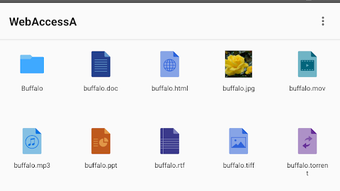
The user interface of WebAccess A is designed with simplicity and functionality in mind, focusing on intuitive navigation for accessing NAS content. The layout prioritizes media files and folders, allowing users to browse and select content with minimal steps. Navigation is straightforward, relying on standard Android interaction patterns such as taps, swipes, and menu selections.
The workflow for streaming, downloading, or uploading files is consistent across different file types, reducing the learning curve. The app maintains a responsive interface during media playback and file transfers, though specific performance metrics were not provided by the developer. General software behavior suggests stable operation under typical usage conditions.
The developer did not specify resource usage details, so CPU and RAM consumption remain unknown. However, based on the app’s size of 12.5 MB and its focused functionality, it is likely optimized for efficient operation on mid-range Android devices. Stability during extended use and background operations was not documented, but the app’s lightweight nature supports reliable performance.
No reported crashes or bugs were mentioned in the official description.
Compatibility & System Requirements
WebAccess A is designed for Android operating systems. The application requires Android 5.0 or later to function, particularly for devices with SD cards, as specified in the documentation. This ensures compatibility with a broad range of Android smartphones and tablets released in recent years.
The app has a file size of 12.5 MB, indicating a lightweight installation that does not impose significant storage demands. Exact system requirements, such as minimum RAM or processor specifications, were not listed by the developer. Compatibility with specific Buffalo NAS models, including LinkStation, TeraStation, and AirStation, is confirmed.
However, some NAS icons may not appear within the app interface, though access to files and data remains unaffected. The SD card cannot be selected as a target folder for automatic uploads, which may limit certain automation workflows. Platform compatibility information is limited to Android and the listed NAS devices.
No support for iOS or other operating systems was indicated.
Pros and Cons
Pros
- Free to download and use, making it accessible for all users.
- Lightweight application at only 12.5 MB in size.
- Enables remote access to Buffalo NAS devices from Android.
- Supports streaming, downloading, and uploading of media files.
- Includes a unique digital photo frame feature for continuous slideshow playback.
- Automatic upload functionality streamlines file backup and organization.
- Compatible with multiple Buffalo NAS hardware models.
Cons
- Some NAS icons may not display in the app interface, potentially affecting visual navigation.
- SD card cannot be used as a target folder for automatic uploads.
- Compatibility with Android 5.0 or later is required, limiting use on older devices.
- No official support for iOS or other operating systems.
- Specific performance and system resource usage details were not provided.
FAQ Section
Is WebAccess A compatible with iOS devices?
WebAccess A is designed exclusively for Android operating systems. There is no official support for iOS devices at this time.
Can I use WebAccess A without a Buffalo NAS device?
The app is specifically built to work with Buffalo NAS devices. It cannot be used with non-Buffalo NAS hardware or other storage systems.
Is WebAccess A safe to download and use?
As a product developed by Buffalo Inc., the app is distributed through official channels. It is designed to securely access NAS devices, though users should ensure their NAS is properly configured with strong credentials.
How often does WebAccess A receive updates?
Update frequency is not specified in the available documentation. Users should check the app store for the latest version.
Can I use WebAccess A offline?
While the app requires an active connection to access the NAS remotely, downloaded files can be viewed offline. The photo frame feature also operates without an internet connection once media is cached.
Final Thoughts
WebAccess A delivers a focused and functional solution for users with Buffalo NAS devices who need mobile access. Its ability to stream, download, and upload media files, combined with the innovative photo frame feature, makes it a valuable tool for both personal and home use. The app’s free price point and lightweight design enhance its appeal.
While limitations exist—such as the lack of iOS support and restricted SD card usage—the core functionality remains robust and reliable. It is particularly beneficial for Buffalo NAS owners who want to manage their media library on the go, share content effortlessly, and enjoy a digital photo frame experience. For those seeking a secure, no-cost way to access their NAS from Android, WebAccess A offers a practical and user-friendly option.
Download WebAccess A now.






.png)
